How to Transcribe Guitar Tabs from MP3 Using AI
You've got an mp3 — maybe a demo, a cover idea, or a riff you hummed into your phone at 2am — and you need it in tab form. Manually transcribing by ear takes hours and a trained ear most people don't have time to develop. AI transcription now handles pitch detection, rhythm mapping, and instrument separation well enough to produce usable Guitar Pro files in minutes. This guide walks through exactly how the process works and how to do it without paying for three separate tools.
What AI Transcription Actually Does to Your MP3
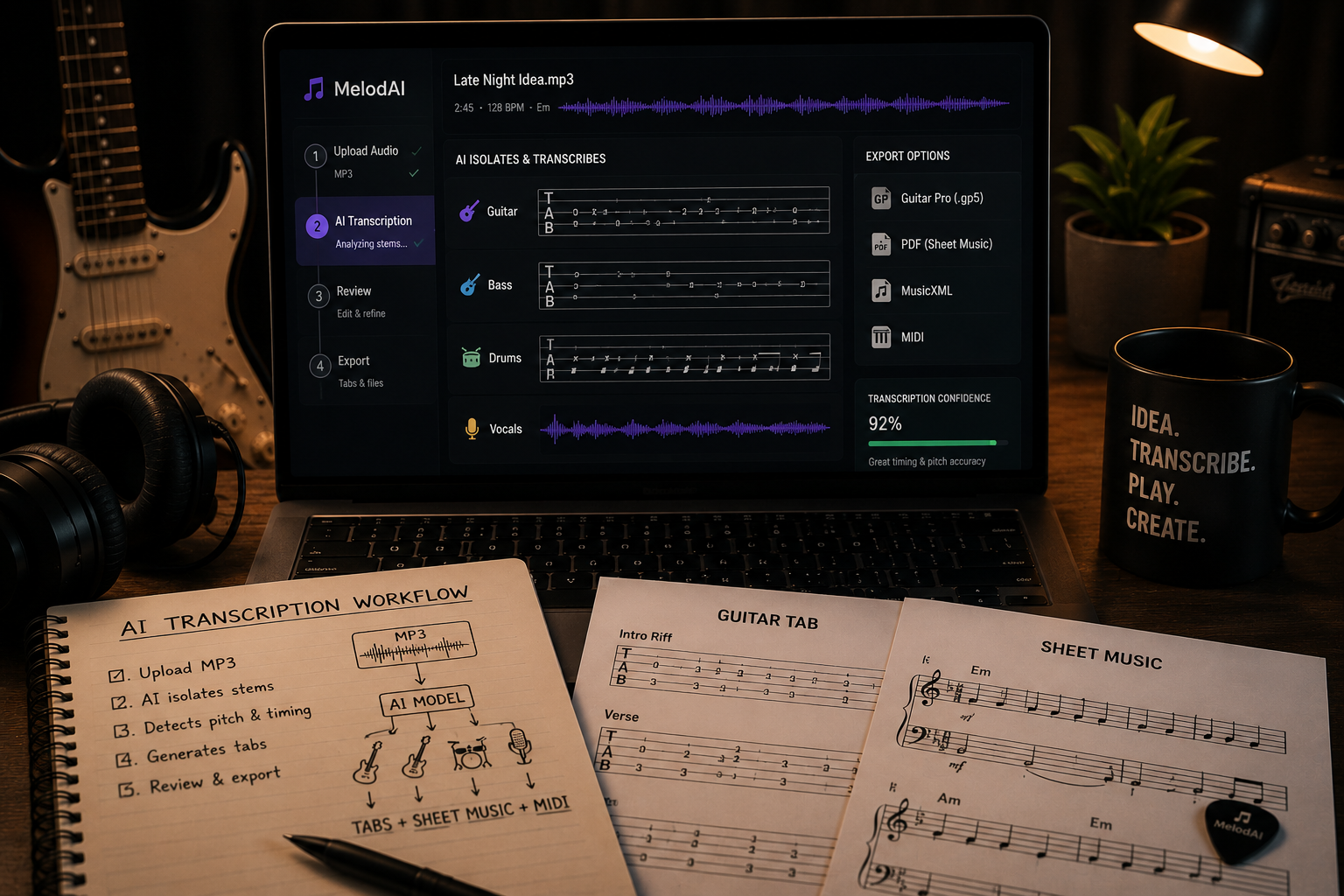
An mp3 is just a compressed audio waveform — no note data, no instrument labels, nothing a human or machine can read as music theory. AI transcription models solve this by running the audio through source separation first, isolating guitar, bass, drums, and vocals into individual stems. Each stem then goes through pitch detection and onset analysis to identify what note was played and exactly when. The output gets quantized into a rhythmic grid and mapped onto a fretboard model to generate realistic fingerings, not just correct pitches.
This is why quality varies so much between tools. Weak transcription engines guess at polyphony (multiple notes at once) and produce tabs that are technically correct but physically unplayable. Good ones account for string tension, hand position, and common voicings so what comes out is something you'd actually use in a practice room. That distinction matters more than any feature list — it's the difference between a tab you edit and one you delete.
Three Ways to Transcribe an MP3 to Guitar Tabs with AI
- Standalone transcription apps: Upload an mp3, get a tab back. Fast, but most only handle single-instrument audio cleanly and struggle with full mixes.
- DAW plugins with AI pitch detection: Built for producers already in a session, but they require manual cleanup and don't export to Guitar Pro format natively.
- AI music platforms with built-in transcription: Generate or upload audio, and the platform handles separation, transcription, and export in one pipeline — no bouncing between apps.
The third option is where MelodAI operates, and it's the only mainstream AI music platform that treats transcription as a core feature rather than an afterthought. Suno and Udio generate audio and stop there — if you want tabs, you're exporting the mp3 and running it through a separate transcription service, then manually cleaning up the fretboard positions yourself. That's two tools, two learning curves, and no guarantee the outputs sync correctly.
| Feature | MelodAI | Suno / Udio |
|---|---|---|
| Generates guitar/bass/piano/drum tabs | ✓ | ✗ |
| Exports to .gp5 | ✓ | ✗ |
| Exports to PDF sheet music | ✓ | ✗ |
| Exports to MusicXML | ✓ | ✗ |
| Royalty-free commercial license | ✓ (paid plans) | Varies |
| Single-platform workflow | ✓ | ✗ |
Step-by-Step: Transcribing an MP3 to Guitar Tabs
- Upload your mp3 or generate a new track from a text prompt describing the song you want.
- Let the AI separate the mix into stems — guitar, bass, drums, keys, vocals.
- Run pitch and rhythm detection on the instrument stem you want tabbed.
- Review the auto-generated tab for fingering accuracy, especially on bends, slides, and chord voicings.
- Export in your preferred format — .gp5 for Guitar Pro editing, PDF for reading, MusicXML for notation software, or MIDI for further production.
One thing worth knowing before you start: transcription accuracy drops with audio quality. A 320kbps mp3 of a clean guitar recording will transcribe far more accurately than a compressed voice memo of a full band rehearsal. If you're starting from scratch instead of an existing recording, generating the track directly through an AI platform skips this problem entirely — the model has access to the exact note data it created, so transcription is closer to a lossless conversion than a guess.
Describe the song — genre, mood, instrumentation, language — and get a full track in under a minute.
The platform automatically separates instruments and converts each into readable tab notation.
Download as .gp5, PDF, MusicXML, or MIDI — pick the format your workflow already uses.
Where AI Transcription Still Needs a Human Ear
No AI model nails every technique on the first pass. Palm muting, hammer-ons, pinch harmonics, and heavily distorted tone can confuse pitch-detection algorithms because the harmonic content is messier than a clean note. Expect to spend a few minutes per song adjusting these details rather than treating the first export as final. Think of AI transcription as producing a strong first draft — it eliminates 90% of the manual work, not 100% of it.
The other limitation is genre-specific notation conventions. Jazz chord voicings, extended techniques in metal, and fingerstyle patterns in folk each have notation norms that generic models don't always follow by default. Platforms built specifically around music generation and transcription — rather than repurposed audio tools — tend to handle these better because the fretboard mapping was trained alongside the audio generation, not bolted on afterward. That's the practical reason to pick a platform where tabs are a native feature, not an integration.
From prompt to playable tab in under a minute.
No separate transcription tool. No manual note-picking. Just export and play.
When to Generate vs. When to Transcribe an Existing MP3
If you already have a recording — a band demo, a voice memo, a reference track you're covering — upload it and transcribe directly. If you're starting from an idea rather than an audio file, generating the track first gives you a cleaner source for transcription and saves the step of recording something rough just to tab it later. Either path lands you at the same output: a tab file you can open in Guitar Pro, print as sheet music, or drop into a DAW as MIDI. The choice comes down to whether the audio already exists or still needs to be made.
Generate your next song with tabs included
Describe it, get the track, get the tab. Export to Guitar Pro, PDF, MusicXML, or MIDI on any paid plan.
Start Creating